
MyMercy
MercyMedical
4.23.20K Reviews
- Version
- 11.8.1
- Installs
- 500.00K
- Age Rating
- Everyone
Screenshots
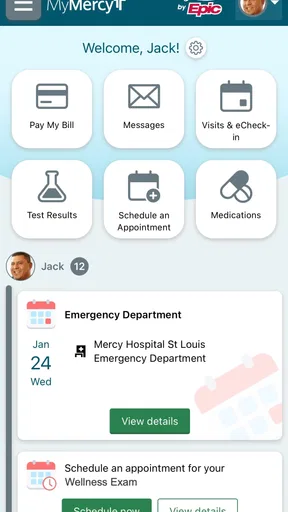
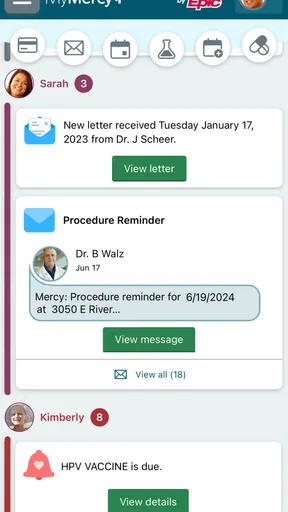
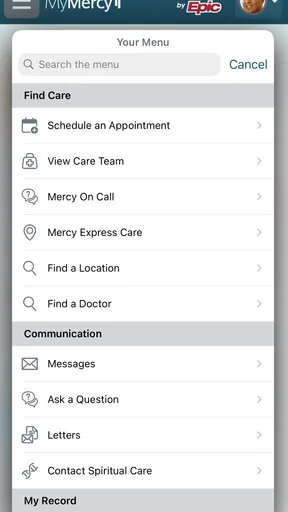
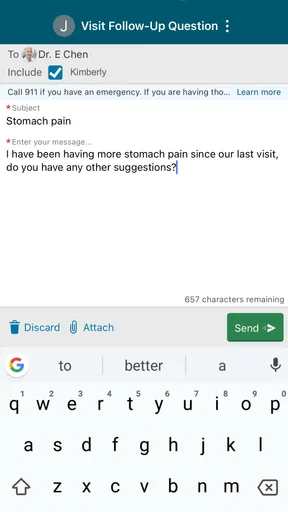
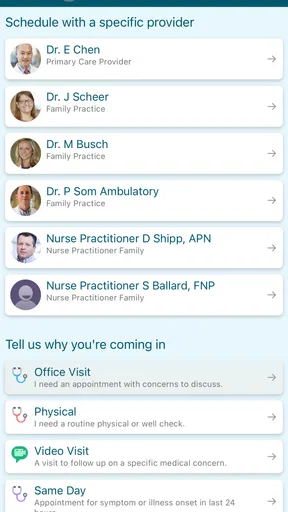
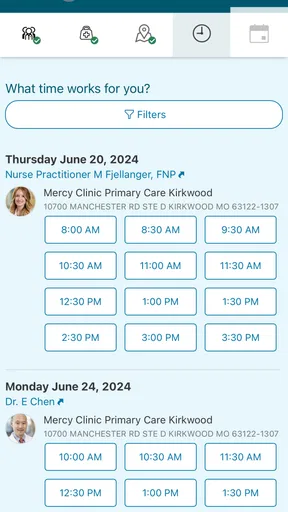
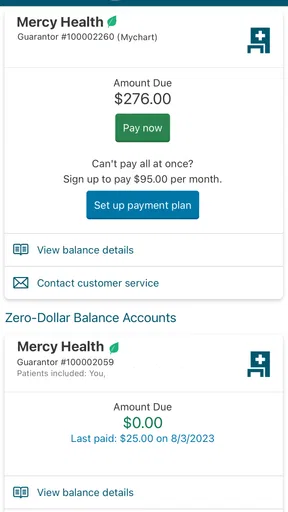
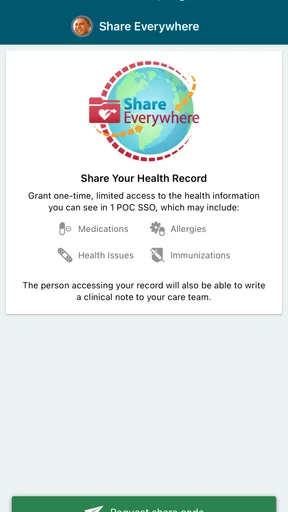
Our Review of MyMercy
 Analysis by Appyee
Managing healthcare from a phone can be useful, but only when the experience feels understandable at the moment you need it. I spent time with MyMercy, the free medical app from Mercy, looking at it less like a feature checklist and more like a tool someone might use while tired, worried, distracted, or dealing with limited mobility. That perspective matters because a healthcare app is not only judged by what it can do; it is also judged by how much effort it demands from the person using it.
MyMercy is aimed at people who already interact with Mercy and want a digital route into their care. It has been available since November 12, 2015, and its current version is 11.8.1. The app is rated for Everyone, runs on operating system version 11 or later, and is available at no cost. Mercy is the developer, and the app has passed the half-million-install mark, with an average rating of 4.1 from about 5,800 ratings.
How MyMercy feels when readability and navigation matter
My first impression is that MyMercy works best when I approach it with a single, practical goal. A healthcare app is easier to handle when I am trying to complete one task rather than casually exploring every area. That is especially true for people who find dense screens, unfamiliar medical language, or long navigation paths tiring.
The most useful habit is to pause before tapping and decide what I actually need: checking a care detail, preparing for an interaction with a provider, or handling an administrative part of healthcare. This sounds simple, but it reduces the mental load that often makes medical apps feel more complicated than ordinary apps. I would rather take a few seconds to identify the task than tap through several sections and lose track of where I am.
Readable navigation is not only about font size. It also involves knowing whether a label describes an action, a record, or a destination. In MyMercy, I found it helpful to treat each screen as a short step in a larger process instead of expecting the app to explain every medical concept in place. If a term is unfamiliar, I would not guess at its meaning or use the app as a substitute for professional advice. I would note it and raise it during the appropriate healthcare conversation.
For users with limited vision, the practical test is whether the phone’s own display settings make the app comfortable enough to use. Increasing text size, adjusting contrast, or enabling the device’s spoken feedback can make a noticeable difference, although the result depends on the phone and operating system. I recommend changing one setting at a time and then checking the screens that matter most, rather than assuming a setting improves every part of the experience equally.
There is also a useful distinction between reading information and entering information. A screen may be easy to scan but more demanding when it asks for several details. If I were helping an older relative, I would set up the app with them while they are calm, not during an urgent appointment. I would also write down their preferred way to reach the relevant care team or service, because relying on memory while stressed is an avoidable barrier.
Why a focused workflow is easier than browsing
MyMercy is more approachable when I use it as a companion to care rather than as a complete health-management world. I would open it before a planned healthcare interaction to gather the information I need, then close it once the task is done. This keeps the app from becoming another place where notifications, records, and decisions compete for attention.
A concrete everyday example would be preparing for an appointment after a difficult week. I might use the app to review the details I already have, make a short list of questions on paper, and keep the phone’s accessibility settings unchanged during the visit. If I become overwhelmed, the paper list remains useful even if I need to stop using the screen. That small backup is particularly valuable for people who experience fatigue, anxiety, or concentration difficulties.
I would not describe the interface as a replacement for a human guide. Someone who rarely uses smartphones may still need another person to explain where to begin. That is not a criticism unique to MyMercy; medical information is inherently more demanding than shopping or entertainment content. Still, the app’s value rises considerably when the user has a clear purpose and a little time to become familiar with the route.
Motor, sensory, and situational access in real use
Touchscreen healthcare tasks can be challenging for people with tremors, reduced dexterity, joint pain, or one-handed phone use. My practical advice is to avoid using MyMercy while walking, carrying bags, or rushing between rooms. A stable surface and a few uninterrupted minutes make accidental taps less likely and give the user time to review what they are about to submit or open.
People who use a larger text setting or spoken feedback should test the complete path they expect to use, not only the first screen. A setting that helps with reading may cause more scrolling, while spoken feedback can change how controls are announced. The right choice is personal. I would prioritize the setting that makes the most important action understandable, even if the screen becomes less compact.
Sensory overload is another consideration. Healthcare information can already create stress, and a phone may add alerts, bright light, or competing distractions. I prefer using a quiet environment, lowering the screen brightness when appropriate, and silencing unrelated phone notifications before opening a medical app. MyMercy benefits from that calmer setup because the user can give more attention to the information in front of them.
For someone with hearing loss, an app can be useful when it lets them handle part of a healthcare process visually, but it should not be treated as proof that every communication need is covered. If a conversation, call, or appointment is involved, I would arrange the communication method that works for that person before the moment arrives. The app can support preparation, but it cannot remove every barrier in the wider healthcare system.
Users with cognitive disabilities may benefit from a very consistent routine. I would keep the phone in the same place, use a short written checklist, and complete one MyMercy task at a time. A trusted supporter can help with the setup without taking over the decisions. That distinction matters: assistance should make the app easier to use while leaving the patient in control of their own information and choices.
Using it when time, privacy, or energy is limited
Situational access is often overlooked. A person may have full vision, hearing, and hand control but still struggle because they are in pain, sitting in a waiting room, caring for a child, or dealing with a weak connection. MyMercy is most useful when I plan around those conditions instead of waiting until the last possible moment.
Before an appointment, I would open the app at home and make sure I know the route to the information I need. I would avoid beginning an important task while my phone battery is low or while I am moving through a busy public place. If privacy matters, I would also think about who can see the screen and whether a notification preview could reveal sensitive information. Those are ordinary phone habits, but they become more important when health details are involved.
For caregivers, the app may be helpful as part of a shared routine, but I would be careful not to assume that one person should manage everything. The patient may want help remembering steps while still wanting to read information personally. A good arrangement is to agree in advance on what the supporter does: perhaps holding the phone steady, reading a label aloud, or writing down questions. That is more respectful and less confusing than having someone else make every tap.
Travel and changing daily routines can also expose weaknesses in any healthcare app. I would prepare important contact information and appointment details before leaving home rather than depending entirely on access at the exact moment of need. MyMercy can be part of that preparation, but it should not be the only plan for urgent situations. If a health problem feels urgent, I would use the appropriate emergency or professional channel instead of trying to solve it through an app.
This is where MyMercy differs from a general health tracker. A tracker is usually built around personal measurements, habits, or trends. MyMercy is more relevant when the user’s need is connected to Mercy’s healthcare environment. A general symptom-search tool may offer broad information, but it cannot provide the same kind of patient-specific usefulness. On the other hand, a person who mainly wants exercise logging, medication reminders, or wellness charts may find a dedicated app more suitable.
Where the experience can still create barriers
The biggest limitation is that the app’s usefulness depends on the user’s relationship with Mercy and on the task they are trying to complete. Someone outside that care context may install it and find little reason to return. That is not a flaw in the idea of a healthcare portal, but it is an important reason not to recommend MyMercy as a universal medical app.
Another barrier is the gap between digital access and healthcare understanding. A clearly presented screen cannot make a diagnosis, explain every clinical phrase, or replace a conversation with a qualified professional. I would avoid making decisions based only on an isolated item displayed in the app. Instead, I would use it to prepare precise questions and confirm what the care team wants me to do.
Accessibility also has limits that no reviewer should hide behind a positive first impression. Device compatibility matters because the minimum operating system is version 11. People using older phones may need a different device or another way to manage their care. The app’s Everyone age rating makes it broadly suitable from a content perspective, but that does not guarantee that every child, older adult, or person with a disability will find it independently usable.
There can also be friction when a user has difficulty remembering passwords, reading verification prompts, or switching between the app and another source of information. I would prepare the necessary account details in a secure way and avoid writing sensitive credentials on an exposed note. If a trusted person helps, I would make sure the arrangement respects privacy rather than casually sharing access.
Compared with calling a healthcare office, MyMercy can feel more convenient when the task is straightforward and the user prefers written steps. A phone call remains better when the situation is complicated, urgent, emotionally difficult, or impossible to describe through a screen. Compared with visiting a website in a browser, the app may feel more natural for regular phone use, but a browser can be preferable for someone who needs a larger display or uses a desktop accessibility setup.
That trade-off is central to my recommendation. I would choose MyMercy for routine digital access connected to Mercy, especially if I am comfortable using a smartphone and can complete tasks without assistance. I would not choose it as the only route for someone who struggles with small touch targets, cannot use the required operating system, or needs immediate personal explanation.
My inclusive verdict on MyMercy
MyMercy is a sensible free medical app for Mercy patients who want healthcare-related tasks available on a phone. Its strongest quality is not that it eliminates every difficulty; it is that it can reduce unnecessary trips through routine care when the user has a clear goal. With a 4.1 average and more than 500,000 installs, it has a substantial user base, though those figures alone cannot tell me whether it will suit a particular person.
I recommend setting it up before a stressful appointment, testing the phone’s text and spoken-feedback settings, and keeping a simple backup plan for important information. Those three steps do more for inclusive use than downloading the app and hoping the interface will solve every problem. They also make it easier to notice early whether the app fits the user’s abilities and daily routine.
My final view is positive but specific: MyMercy is best as a prepared, focused companion to Mercy care. It is not the right choice for everyone, and it should never be treated as an emergency service or a substitute for professional judgment. For users who value mobile access, can use a compatible device, and are willing to build a calm routine around it, the app can make ordinary healthcare administration feel more manageable.
I would recommend it to a friend who receives care through Mercy and wants a free mobile option, especially if that friend appreciates written access rather than making every routine request by phone. I would first ask about their vision, dexterity, hearing, privacy needs, and comfort with account-based apps. If those needs are covered by their phone settings and support routine, MyMercy is worth trying. If not, a browser, a larger device, a caregiver-assisted workflow, or direct contact with the healthcare office may be the more inclusive answer.
Privacy and Permissions
See what permissions an app requests and how it handles your data.
- Location
- approximate location (network-based), precise location (GPS and network-based)
- Phone
- directly call phone numbers
- Photos/Media/Files
- read the contents of your USB storage, modify or delete the contents of your USB storage
- Storage
- read the contents of your USB storage, modify or delete the contents of your USB storage
- Camera
- take pictures and videos
- Microphone
- record audio
- Other
- view network connections, pair with Bluetooth devices, access Bluetooth settings, full network access, change your audio settings, run at startup, control vibration, prevent device from sleeping, Google Play license check
Verdict
Strengths of MyMercy
- Easy access to Mercy health records, test results, and visit summaries.
- Secure in-app messaging helps users contact their care team conveniently.
- Appointment scheduling and reminders make managing care more organized.
- Prescription refill requests can save time compared with calling the clinic.
- Supports bill viewing and payments directly from a mobile device.
Limitations of MyMercy
- Some features may vary depending on the Mercy facility or care provider.
- Account setup can require identity verification and matching personal details.
- Certain test results may appear before a doctor has reviewed them.
- The app is less useful for patients outside the Mercy healthcare network.
- Technical issues or maintenance may temporarily limit access to records.
Similar Picks in This Category
View All
WebMD: Symptom Checker
WebMD, LLC4.1

Microphone Amplifier
DOSA Apps4.2

Anatomy Learning - 3D Anatomy
3D Medical OU4.5

Period Tracker and Calendar
SimpleInnovation4.9

GoodRx: Prescription Coupons
GoodRx4.8

CVS Health
CVS Pharmacy4.5
Frequently Asked Questions
What is MyMercy, and what can I use it for?
MyMercy is Mercy Health’s patient portal app, designed to help users manage healthcare tasks from a mobile device. After signing in, you can typically review medical information, check appointments, communicate with care teams, request prescription refills, view test results, and manage certain billing or insurance details. Available features may vary depending on your Mercy location, provider, and account permissions.
How do I create an account or sign in to MyMercy?
To use MyMercy, you generally need an existing Mercy patient account or an activation process provided by Mercy Health. Registration may require personal information, an activation code, or identity verification to protect your medical records. Once your account is created, you sign in with your credentials through the app. If you forget your password or cannot complete verification, use the recovery options or contact Mercy support.
Can I schedule appointments and communicate with my doctor through MyMercy?
MyMercy can make it easier to manage appointments without calling the office, although scheduling options depend on the provider and type of care required. You may be able to request, reschedule, or cancel eligible appointments and receive reminders. The app may also support secure messaging with participating healthcare professionals. Messages are not intended for emergencies, and response times can vary.
Does MyMercy show test results, prescriptions, and medical records?
The app may provide access to portions of your electronic health record, including laboratory results, visit summaries, medications, allergies, immunizations, and clinical notes. Some results can appear automatically, while others may be released only after a clinician reviews them. Prescription refill and medication-management options also depend on the pharmacy, provider, and current treatment plan. Always discuss confusing or concerning results with a qualified healthcare professional.
Is MyMercy safe to use, and what should I do if I have a technical problem?
MyMercy is intended to use secure account access and protected communication for handling personal health information, but users should still take precautions. Use a strong password, enable available security features, avoid signing in on shared devices, and keep the app updated. If the app crashes, fails to load information, or rejects your login, check your connection, update or reinstall it, and contact official Mercy support rather than sharing account details with others.
